
Features Vinylpostcards
The Vinylpostcards App gives you the opportunity to play your Vinylpostcards even without a record player!Just open the app, launch the Scan Mode and point the camera at your Vinylpostcard.
As soon as the app recognises the card by its graphic surface, a record player pops up and the card starts to spin in Augmented Reality!Access additional exclusive content of every card, only available via the Vinylpostcards App.Organise your cards in the library of the app and take your collection with you wherever you go!In detail "How to use?" description...Scan Mode:When you get a new Vinylpostcard and want to play its content for the very first time via the app, go into "Scan Mode".
You can find the button on the bottom right.
After granting access to your camera, you will see a square in the middle of the screen.
Place that square around the grooves of your Vinylpostcard for the App to recognise the card.
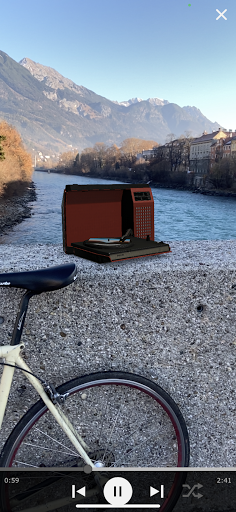
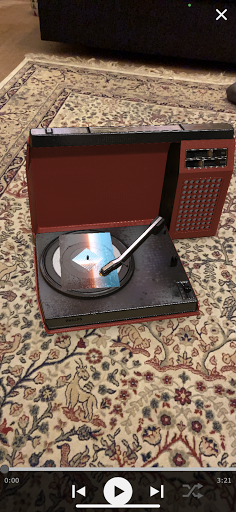
As soon as the recognition was successful, a record player appears in Augmented Reality on your screen and starts to play back the card with vinyl charm.
You now have full access to the digital content that comes attached to the card - Once a card was scanned, its content is saved automatically to the library of the App and does not need to be scanned again.
Unless you want to!Music Player:As soon as you leave the scan mode via the X Button at the top right, you access the Music Player.
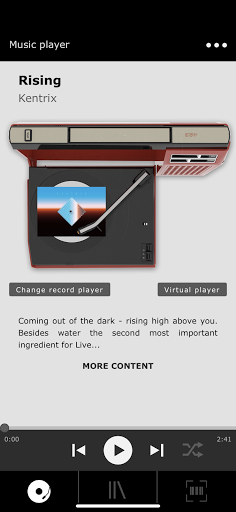
You see a record player through bird’s-eye view and two buttons below saying "Change record player" and "Virtual Player", as well as a short introduction text into the card you are currently playing.
Right underneath that introduction, you see a button saying: "More Content".
Click on it to gain access to the additional content that comes with every card.
Back at the Music Player, you are able to change your record player through the according button and access the Augmented Reality Player Mode.
Tap "Virtual Player" and your camera opens up.
It tells you to "scan your environment until a surface is detected".
Move your camera around the room, so the app recognises the dimensions of your surrounding (Tip: Moving the camera over corners, especially where walls meet the floor, is the quickest way for the app to detect the surrounding.) As soon as the app detects the room’s dimensions, a skeleton of the record player appears and you can “Tap the screen to place the record player”.
By tapping, you are now able to place the record player anywhere in the room.
Play the card you have chosen earlier or skip to the next card via the control buttons at the bottom.The Library:Every card you have once scanned in the app, will automatically be saved to your Library.
That way, you have digital access to the card’s music and content, without carrying the physical card with you.
Some cards come with more than just one track so you will see each of the tracks lined up underneath in the library.
Main Menu:At the top right, you will find a 3-dots menu that will give you access to the main menu of the app: Music PlayerLibraryScan“About” (Tap it to find out more about our company and how this whole journey started)Feedback:If you experience any problems or would like to give some feedback, we are happy to hear it!Just email us at: [email protected]
Music Features
Enjoy high-quality music streaming and playback features.
Gaming Features
Enjoy immersive gaming experience with various game modes.
Camera Features
Advanced camera features with editing capabilities.
See the Vinylpostcards in Action
Get the App Today
Available for Android 8.0 and above